Showing posts with label PES Balls. Show all posts

PES 2021 Ball Server Pack Update 2021/2022

PES 2021 Ball Server Pack Update 2021/2022 by Txak

PES 2021 Ball Server Pack Update 2021/2022

New ballpack 2021/2022 made by Txak. Recommended to use alongside Hawke's ball server pack !

PES 2021 Ball Server Pack by Hawke

DONATE : http://paypal.me/txak84

Thread : https://evoweb.uk/threads/90225/


Includes : 

Puma LaLiga 21-22 Balls
Nike Flight CONMEBOL Libertadores 2022
Nike Flight Premier League Trophy 21-22 Balls
Voit 100 Liga MX Apertura 2021 (for league matches)
Voit 100 Liga MX Apertura 2021 (Liguilla) (for playoff matches)
Voit 100 Liga MX Apertura 2021 (Rosa) (for day against cancer)

Ball Name = Ball ID

Puma LaLiga Santander Accelerate = 301
Puma LaLiga Santander Adrenalina = 302
Puma LaLiga Smartbank Accelerate = 303
Puma LaLiga Smartbank Adrenalina = 304
Nike Flight CONMEBOL Libertadores = 201
Nike Flight Premier League Trophy = 201
All Voit Ball ID = 999
Share:

PES 2021 Classic Ball Server Pack by Lordgaroxx

PES 2021 Classic Ball Server Pack by Lordgaroxx

Classic Ball Pack made by lordgaroxx. Credit also goes to Hawke for providing the model. Recommended to use alongside Hawke's ball server pack !


Thread : https://evoweb.uk/threads/90225/


Includes : 

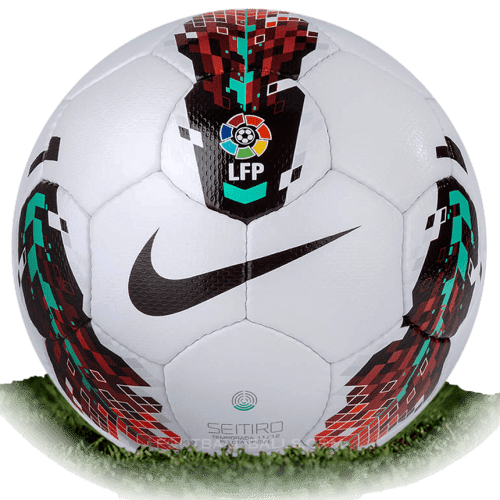
Nike Setiro Laliga 2011/12
Nike Setiro Laliga 2011/12 Hi-vis
Share:

PES 2021 Ball Server Pack V16 AIO by Hawke [500+ Balls]

PES 2021 Ball Server Pack by Hawke

PES 2021 Ball Server Pack by Hawke

New ball server pack collection for eFootball PES 2021/PES 2020 PC. Includes more than 480 balls for PES 2020. Also all these balls have been linked to competition.

500+ Balls available for selection in the Ball Server Sider Overlay Menu:
Balls auto linked to 30+ competitions via map_competitions.txt:

What's new in Vol 16 : https://i.imgur.com/yfkr2RF.jpg


*NOTE : 

1. Download & install Ball Server

2. Copy the "content" folder from the Ball Server Pack .RAR archive to your Sider folder. Delete any other ball packs first..this is an AIO pack.

NOTE: Don't try to mix ball packs or you will face problems/errors..either use this one or choose another one...you can of course add your own balls after installing this pack.

Credits:
@zlac / Ball Server
@juce - nesa24 / Sider
@Angelj107 / Umbro Prodige Coupe De France model / T90 models + Normals / Massive help with fmdl to blender (Thanks Mate)
@-cRoNoS- - Danyy - ppaaggpp / 2017 balls (Thanks for allowing me to convert them)
@Txak / Puma La Liga Ball
@Tiitoo / CAF Umbro Neo Pro Ball
Vito Colangelo / Some Models
@josemiguel_miuccio / Fevernova & Roteiro Models
@shawminator / CGPE
All other balls made by @Hawke + Konami + FIFA
@ziyech.2304 for help & support in general
Share:

PES 2017 Ballpack Season 2020/2021

PES 2017 Ballpack Season 2020/2021

New balltpack collection for 2020/2021 Season. This kitpack can be used for all PES 2017 Patches. Thanks to Arshia Davtalab & ARC_mods17.


*Updated V6

How to Use : 

1. Extract the file with WinRAR,

2. Copy .CPK file to your PES 2017 download folder.

C:\Program Files(x86)\steam\steamapps\common\Pro Evolution Soccer 2017\download\

3. Generate with PES 2017 DpFileList Generator.

4. Done


PASSWORD : www.pesnewupdate.com 
Share:

PES 2021/PES 2020 Ball Server Pack by Hawke

PES 2021 Ball Server Pack V3 AIO by Hawke [ 330+ Balls ]

PES 2021 Ball Server Pack by Hawke

New ball server pack collection for eFootball PES 2021/PES 2020 PC. Includes more than 320 balls for PES 2020. Also all these balls have been linked to competition.

330+ Balls available for selection in the Ball Server Sider Overlay Menu:
Balls auto linked to 30+ competitions via map_competitions.txt:


*NOTE : 

1. Download & install Ball Server

2. Copy the "content" folder from the Ball Server Pack .RAR archive to your Sider folder. Delete any other ball packs first..this is an AIO pack.

NOTE: Don't try to mix ball packs or you will face problems/errors..either use this one or choose another one...you can of course add your own balls after installing this pack.

Credits:
@zlac / Ball Server
@juce - nesa24 / Sider
@Angelj107 / Umbro Prodige Coupe De France model / T90 models + Normals / Massive help with fmdl to blender (Thanks Mate)
@-cRoNoS- - Danyy - ppaaggpp / 2017 balls (Thanks for allowing me to convert them)
@Txak / Puma La Liga Ball
@Tiitoo / CAF Umbro Neo Pro Ball
Vito Colangelo / Some Models
@josemiguel_miuccio / Fevernova & Roteiro Models
@shawminator / CGPE
All other balls made by @Hawke + Konami + FIFA
@ziyech.2304 for help & support in general
Share:

PES 2020 Ball-Server Pack V14 AIO by Hawke [ 300+ Balls ]

PES 2020 Ball-Server Pack V13 AIO by Hawke [ 280+ Balls ]

PES 2020 Ball-Server Pack by Hawke

New ball server pack collection for eFootball PES 2020 PC. Includes more than 300 balls for PES 2020. Also all these balls have been linked to competition in PES 2020.

300+ Balls available for selection in the Ball Server overlay menu:
Balls auto linked to 30+ competitions via map_competitions.txt.


How to Use :

1. Install Sider 6

2. Install CommonLib + Ball Server by Zlac

3. Extract file with WinRAR, copy content folder to your sider location

4. Play !

*NOTE : 

Delete any other ball packs first..this is an AIO pack.

NOTE: Don't try to mix ball packs or you will face problems/errors..either use this one or choose another one...you can of course add your own balls after installing this pack.
Share:

PES 2020 [Sider Module] Ball Server v1.00 for Sider 6 by Zlac

PES 2020 [Sider Module] Ball Server for Sider 6 by Zlac

Add many ballpack into eFootball PES 2020 PC as you want with new BallServer for Sider 6 by Zlac. Sider 6.1.0 ( or newer ) is required to use this module.
How to use:

1. Install Sider 6 ( latest version )

2. Unpack with WinRAR and then copy folders content and modules inside your sider folder (folder where you have sider.exe file) - overwrite, if asked

3. (If not done already) Download and install CommonLib.lua v1

4. (If not done already) Add lua.module = "BallServer.lua" under CommonLua.lib in sider.ini


5. [Optional] Customize map_teams.txt and map_competitions.txt files and add more ball folders in content\ball-server folder (more instructions can be found inside .txt files)

[ EXAMPLE ] How to apply mini ball pack: 

1. Download ball pack from the link, extract the archive, delete everything within your current content\ball-server folder in your sider, copy everything within ball-server folder from the update pack to your content\ball-server folder in your sider.

FEATURES :

  • GDB-style unlimited ball management
  • original ball packaging (identical folder structure and file names, as they are in .cpk files)
  • ball assignment to individual home teams via map_teams.txt file
  • ball assignment to competitions via map_competitions.txt file - i.e. all teams participating in particular competition will use identical ball
    • IMPORTANT: by default, competition assignment always takes priority over team assignment in all modes except Exhibition mode matches
      • but, there's a way to override that behavior for any individual competition - by slightly modifying BallServer.lua script itself, you can add/remove competition IDs in override_competitions table, thus defining more or less competitions where team assignment takes priority over competition assignment
    • support for optional ball to be used in final match only
    • support for optional ball to be used during winter season
  • Multiple balls can be assigned to a competition via map_competitions.txt - if more than one ball is available, Ball Server selects one randomly
  • Multiple balls assigned to a competition - map_competitions.txt
65535, 207, Ordem V,,,,             # exhibition match
65535, 060, Merlin Serie A,,,,      # exhibition match

  • correct ball previews and ball names are displayed in game menus (where available, depending on game mode)
  • .txt assignment files reloading (key 0) - available at any moment, useful for making quick fixes to .txt assignment files, without needing to restart the game
  • toggle between manual ball selection and automatic ball assignment via .txt files (key 9)
    • if manual selection is used, then manually selected ball has priority over the ball which would otherwise be assigned via .txt files
  • additional options, available only in manual selection mode:
    • Manual selection by cycling through all the available balls (PageUp/PageDown keys)
      • IMPORTANT: only the balls which are assigned via .txt files are available for cycling-through!! A ball which exists only as a subfolder in the external content root (content\ball-server), but is not assigned to any team or competition via .txt files WILL NOT be available for manual selection either!
    • Favorite ball - current manual selection can be saved permanently as a favorite ball (key 7) or recalled to be used later (key 8)
  • ball previews visible on overlay, when possible
  • option to always use random ball, for every match - be it exhibition or competition. Option is set to On/Off via overlay key "6". The selection is not saved permanently, therefore with each new game launch, option is set to "Off"
  • automatic selection of league-mode ball(s) in exhibition mode if both teams belong to the same league (requires CommonLib v1 to be installed)
    • applies only to LEAGUES - cups and other competitions are ignored
    • script reads CompetitionEntry.bin file to determine whether two teams belong to the same league - selection may not be 100% accurate if teams have been moved to different leagues only in EDIT mode

Current Limitations

  • Inaccurate ball selection during replays - due to game design, saved replays do not include tournament_ID - if the ball used in saved replay has been assigned via map_competition.txt, then there is no way to re-select exactly the same ball during replay - exhibition mode ball is most likely going to be selected.
  • Although all overlay features (manual ball selection, .txt files reloading, ...) are available at any moment (and it cannot be done differently, due to the way the overlay currently works in sider), it is not advisable to change any overlay-related settings after the match-loading screen has appeared or during the match. In-game behavior will be unpredictable in such circumstances. You've been warned ;) Make your selections BEFORE you hit the Next match button.

Additional general-purpose notes related to sider and .lua scripting:

  • Lua scripts have priority over live cpk root folders. Therefore, if you use Ballserver.lua script, you do not need ball packs in live cpk roots too. It is advisable to remove them, to avoid possible conflicts.
  • When multiple scripts contend for the same content (e.g. Ballserver and N more scripts that all want to switch the balls), then the script that is listed first/highest in the lua.module section of sider.ini has priority. So, if you intend to use Ballserver as a primary source of custom balls, move lua.module = "BallServer.lua" entry ABOVE other scripts that also serve custom balls.
  • If you have multiple scripts that use overlay, than use key 1 to cycle through them and choose which script is currently shown on the overlay (Ballserver.lua, camera.lua, ...)
Share:

PES 2020 Ball-Server Pack Classic AIO by Vito and Trokut (108 Balls)​

PES 2020 Ball-Server Pack Classic AIO by Vito and Trokut (108 Balls)​

Classic Balls for PES 2019 and also eFootball PES 2020 PC. To use this ballpack you need Ball-Server by Zlac + Sider to be installed in your PES game

Requirements :

Sider 5 for PES 2019 or Sider 6 for PES 2020
Ball Server by Zlac ( Works for PES 2019/PES 2020 )

Download


1. Install Sider + Ball-Server

2. Copy all the ball directories contained in the archive in your ballserver directory

3. Copy the map_competition,txt in your ballserver directories or add the lines of the map_competitions.txt contained in the archive to your existent map_competitions.txt

4. Start PES 2020 and select your ball of choice via Sider overlays menu'
Share:

PES 2020 / PES 2019 Ball-Server Ballpack Season 2019/2020

Adidas Argentum Superliga Argentina 2019/2020

PES 2020 / PES 2019 Ball-Server Ballpack Season 2019/2020

New Ballpack 2019/2020 for PES 2019 and also eFootball PES 2020 PC. To use this ballpack you need Ball-Server by Zlac + Sider to be installed in your PES game

Requirements :

Sider 5 for PES 2019 or Sider 6 for PES 2020
Ball Server by Zlac ( Works for PES 2019/PES 2020 )

Download


Installation :

1. Install Sider + Ball-Server

2. Copy all the ball directories contained in the archive in your ballserver directory

3. Copy the map_competition,txt in your ballserver directories or add the lines of the map_competitions.txt contained in the archive to your existent map_competitions.txt

4. Start PES 2020 and select your ball of choice via Sider overlays menu'
Share:

PES 2020 Balls Adidas Argentum Superliga Argentina 2019/2020 by Vito

Adidas Argentum Superliga Argentina 2019/2020

PES 2020 Balls Adidas Argentum Superliga Argentina 2019/2020 by Vito

New Balls for eFootball PES 2020 Demo Version. Includes latest balls for 2019/2020 season. Thanks to Vito.

Download

PES 2020 Balls Adidas Argentum Superliga Argentina 2019/2020 by Vito

How to Use :

1. Extract the file with WinRAR,

2. Copy .CPK file to your PES 2020 download folder.

C:\Program Files(x86)\Steam\steamapps\common\PeFootball PES 2020 DEMO\download\

3. Generate with PES 2020 DpFileList Generator.

4. Done.
Share:

PES 2020 Balls Adidas Conext19 2019 by Vito

PES 2020 Balls Adidas Conext19 2019 by Vito

PES 2020 Balls Adidas Conext19 2019 by Vito

New Balls for eFootball PES 2020 Demo Version. Includes latest balls for 2019/2020 season. Thanks to Vito.

Download

How to Use :

1. Extract the file with WinRAR,

2. Copy .CPK file to your PES 2020 download folder.

C:\Program Files(x86)\Steam\steamapps\common\PeFootball PES 2020 DEMO\download\

3. Generate with PES 2020 DpFileList Generator.

4. Done.

Share:

PES 2020 Demo Ballpack by Vito

eFootball PES 2020 Demo Ballpack by Vito

New Balls for eFootball PES 2020 Demo Version. Includes latest ballpack for 2019/2020 season. At this moment, you can only choose one ball at a time ! Credit and thanks to Vito and all ballmaker.

Download


How to Use :

1. Extract the file with WinRAR,

2. Copy .CPK file to your PES 2020 download folder.

C:\Program Files(x86)\Steam\steamapps\common\PeFootball PES 2020 DEMO\download\

3. Generate with PES 2020 DpFileList Generator.

4. Done.
Share:

PES 2019 Ballpack Adidas Champions League 2019/2020 by Vito

PES 2019 Ballpack Adidas Champions League 2019/2020 by Vito

New Balls for PES 2019 PC Game. Includes latest ballpack for 2019/2020 season.

Download : PES 2019 Ballpack Adidas Champions League 2019/2020 by Vito

PES 2019 Ballpack Adidas Champions League 2019/2020 by Vito

PES 2019 Ballpack Adidas Champions League 2019/2020 by Vito

1. Install Ball-Server or EvoBall in EvoSwitcher 2019.

2. Copy the full structure (of the Nike Merlin EPL ball directories contained in the rar archive ) to ballserver or evoball directory

3. Add these lines to the "map_competitions.txt of your ballserver or evoball": 0, 201, [ball name], , , , #not linked to any competiton but added so it's selectable in the overlay menu

Note : This ball its fully compatible with Hawke Ball-Server pack version, is linked to 0 and you can use it in manual and automatic mode selection in the Sider overlays.
Share:

PES 2019 Ballpack Derbystar Select Bundesliga 2019/2020 by Vito

PES 2019 Ballpack Derbystar Select Bundesliga 2019/2020 by Vito

New Balls for PES 2019 PC Game. Includes latest ballpack for 2019/2020 season.

Download : PES 2019 Ballpack Derbystar Select Bundesliga 2019/2020 by Vito


1. Install Ball-Server or EvoBall in EvoSwitcher 2019.

2. Copy the full structure (of the Nike Merlin EPL ball directories contained in the rar archive ) to ballserver or evoball directory

3. Add these lines to the "map_competitions.txt of your ballserver or evoball": 0, 201, [ball name], , , , #not linked to any competiton but added so it's selectable in the overlay menu

Note : This ball its fully compatible with Hawke Ball-Server pack version, is linked to 0 and you can use it in manual and automatic mode selection in the Sider overlays.
Share:

PES 2019 Ballpack Nike Merlin Pitch Premier League 2019/2020 by Vito

PES 2019 Ballpack Nike Merlin Pitch Premier League 2019/2020 by Vito

New Balls for PES 2019 PC Game. Includes latest ballpack for 2019/2020 season.

Download : PES 2019 Ballpack Nike Premier League 2019/2020 by Vito

PES 2019 Ballpack Nike Merlin Pitch Premier League 2019/2020 by Vito

PES 2019 Ballpack Nike Merlin Pitch Premier League 2019/2020 by Vito

1. Install Ball-Server or EvoBall in EvoSwitcher 2019.

2. Copy the full structure (of the Nike Merlin EPL ball directories contained in the rar archive ) to ballserver or evoball directory

3. Add these lines to the "map_competitions.txt of your ballserver or evoball": 0, 201, [ball name], , , , #not linked to any competiton but added so it's selectable in the overlay menu

Note : This ball its fully compatible with Hawke Ball-Server pack version, is linked to 0 and you can use it in manual and automatic mode selection in the Sider overlays.
Share:

PES 2019 Ballpack Nike Merlin Serie A TIM 2019/2020 by Vito

PES 2019 Ballpack Nike Merlin Serie A TIM 2019/2020 by Vito

New Balls for PES 2019 PC Game. Includes latest ballpack for 2019/2020 season.

Download

PES 2019 Ballpack Nike Merlin Serie A TIM 2019/2020 by Vito

PES 2019 Ballpack Nike Merlin Serie A TIM 2019/2020 by Vito

1. Install Ball-Server or EvoBall in EvoSwitcher 2019.

2. Copy the full structure (of the Nike Merlin EPL ball directories contained in the rar archive ) to ballserver or evoball directory

3. Add these lines to the "map_competitions.txt of your ballserver or evoball ": 0, 060, [ball name], , , , #not linked to any competiton but added so it's selectable in the overlay menu

Note : This ball its fully compatible with Hawke Ball-Server pack version, is linked to 0 and you can use it in manual and automatic mode selection in the Sider overlays.
Share:

PES 2017 Ballpack Season 2019/2020

PES 2017 Ballpack Season 2019/2020

New ballpack for 2019/2020 Season. Works with all PES 2017 patches.

Download : PES 2017 Ballpack Season 2019/2020

Install : 

1. Extract the file with WinRAR,

2. Copy cpk file to your PES 2017 game folder

C:\Program Files(x86)\Steam\steamapps\common\Pro Evolution Soccer 2017\download\

3. Generate with PES 2017 DpFileList Generator

4. Done


Share:

PES 2019 Ballpack Nike Premier League 2019/2020 by Vito

PES 2019 Ballpack Nike Premier League 2019/2020 by Vito

New Balls for PES 2019 PC Game. Includes latest ballpack for 2019/2020 season.

Download : PES 2019 Ballpack Nike Premier League 2019/2020 by Vito

PES 2019 Ballpack Nike Premier League 2019/2020 by Vito

PES 2019 Ballpack Nike Premier League 2019/2020 by Vito

1. Install Ball-Server or EvoBall in EvoSwitcher 2019.

2. Copy the full structure (of the Nike Merlin EPL ball directories contained in the rar archive ) to ballserver or evoball directory

3. Add these lines to the "map_competitions.txt of your ballserver or evoball": 0, 201, [ball name], , , , #not linked to any competiton but added so it's selectable in the overlay menu

Note : This ball its fully compatible with Hawke Ball-Server pack version, is linked to 0 and you can use it in manual and automatic mode selection in the Sider overlays.
Share:

PES 2019 Balls Puma 2019/2020 by Txak

PES 2019 Balls Puma 2019/2020 by Txak

New Balls for PES 2019 PC Game. PES 2019 Balls Puma 2019/2020 by Txak can be used for all patches. PES 2019 Balls Puma 2019/2020 by Txak is compatible with Hawke Ball-Server pack version

Download : PES 2019 Balls Puma 2019/2020 by Txak


Share:

PES 2019 Ball-Server Pack Classic AIO by Vito and Trokut (108 Balls)​

Mikasa FT-5

PES 2019 Ball-Server Pack Classic AIO by Vito and Trokut (108 Balls)​

Classic Balls for PES 2019 PC Game. To use Adidas Jabulani you need Ball-Server by Zlac. For EvoSwitcher user, it's recommended to use Ball-Server instead EvoBall module.

Download

1. Install Ball-Server

2. Copy all the ball directories contained in the archive in your ballserver directory

3. Copy the map_competition,txt in your ballserver directories or add the lines of the map_competitions.txt contained in the archive to your existent map_competitions.txt

4. Start Pes 2019 and select your ball of choice via Sider overlays menu'

Requirements: Sider 5.1.5 or above, Ballserver 2.3.1

Note : This ball its fully compatible with Hawke Ball-Server pack version, is linked to 0 and you can use it in manual and automatic mode selection in the Sider overlays.

PES 2019 Ball-Server Pack Classic V1 AIO by Vito and Trokut (108 Balls)​
Share:

Blog Archive